
News & Events
How to Claim Your Business on ChatGPT – Step-by-Step Guide (With KingofSEO Software Example)
No Comments

Introduction
Do you want to establish your business identity on ChatGPT and use your company’s verified domain?
OpenAI provides a business domain verification process through ChatGPT Business. By verifying your domain, an organisation can establish control over its business domain and use organisation-related features.
In this tutorial, we will explain how to claim and verify a business domain step by step, using KingofSEO Software Solutions and Training Private Limited as an example.
Example business details:
| Detail | Example |
|---|---|
| Business name | KingofSEO Software Solutions and Training Private Limited |
| Website | https://kingofseo.in/ |
| Domain | kingofseo.in |
| info@kingofseo.in | |
| DNS provider | Hostinger |
Business Hub allows eligible businesses to:
-
Claim an existing business listing.
-
Verify business ownership or authorization.
-
Update business information and website details.
-
Add business descriptions, logos and service information.
-
View business mentions and website-click insights.
-
Access additional features where eligible.
Important: Claiming a business is different from verifying a domain for a ChatGPT Business workspace. Business Hub is the feature used to claim a business profile.
Step-by-Step Guide to Claim Your Business on ChatGPT
Step 1: Open ChatGPT Business Hub
-
Open your browser.
-
Sign in using your ChatGPT account.
-
Find the business claiming option.
Step 2: Search for Your Business
Search using your registered business name.
Example:
KingofSEO Software Solutions and Training Private Limited
If your business appears in the search results:
-
Select the correct business listing.
-
Check the business details.
-
Confirm that you are authorized to manage the business.
-
Continue with the claim process.
If you cannot find your business, Business Hub may offer an option to add a business for eligible online businesses.
Step 3: Select a Verification Method
ChatGPT may provide different verification methods depending on your business.
| Verification method | What you need |
|---|---|
| Business phone | Access to the registered phone number |
| Business email | Access to the business email |
| Website domain | Access to your website DNS settings |
| Shopify store | Access to your Shopify account |
For KingofSEO Software, website domain verification is a suitable option if it is offered.
Step 4: Verify Your Website Domain
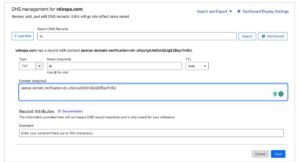
Let’s use the KingofSEO website as an example.
-
Website:
https://kingofseo.in/ -
Domain:
kingofseo.in -
DNS provider: Hostinger
Follow these steps:
-
Select the website domain in ChatGPT Business Hub.
-
Enter
kingofseo.inif requested. -
ChatGPT will generate a DNS TXT verification record.
-
Copy the complete TXT record name and value.
Remember: Every business receives its own verification value. Do not copy another website’s TXT record.
Step 5: Add the TXT Record in Hostinger
Since KingofSEO uses Hostinger for DNS management, follow these steps:
-
Sign in to your Hostinger account.
-
Open Domains.
-
Select
kingofseo.in. -
Navigate to DNS / Nameservers or DNS Zone Editor.
-
Find the option to add a new DNS record.
-
Select TXT as the record type.
-
Enter the TXT name/host provided by ChatGPT.
-
Paste the complete TXT verification value.
-
Save the record.
Example TXT record (illustration only)
| Field | Value |
|---|---|
| Type | TXT |
| Name | As provided by ChatGPT |
| Value | OpenAI-generated verification code |
| TTL | Hostinger default |
Do not use sample values
Use the exact record supplied in your own Business Hub verification screen.
Step 6: Return to ChatGPT and Verify
After saving the DNS record:
-
Return to ChatGPT Business Hub.
-
Click Verify domain.
-
Wait while ChatGPT checks the DNS record.
-
Follow any additional verification instructions.
DNS changes may take some time to become publicly visible.
Step 7: Wait for Claim Approval
After submitting your claim:
-
OpenAI reviews your business claim.
-
You may receive an approval email.
-
OpenAI may request additional information.
-
Wait for the final approval before assuming the business is claimed.
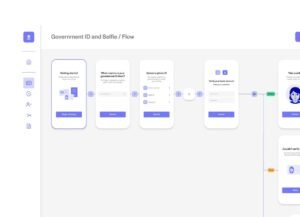
After your business claim is approved, you may need to complete identity verification through Persona.
You may be asked for:
-
Government-issued identity proof.
-
Business registration information.
-
Proof that you are authorized to represent the company.
After approval, eligible business owners can manage their business information and access Business Hub insights.
Note: A claimed business profile and a blue verified check are not the same thing. The blue check requires approved Persona verification.
Step 9: Update Your Business Profile
-
Once the claim and required identity verification are approved, update your business information.
Example: KingofSEO Software
| Business information | Details |
|---|---|
| Business name | KingofSEO Software Solutions and Training Private Limited |
| Website | https://kingofseo.in/ |
| Business category | Digital Marketing Training / Software Solutions |
| Location | Medavakkam, Chennai, Tamil Nadu |
| info@kingofseo.in | |
| Phone | 7338968869 |
Suggested business description:
KingofSEO Software Solutions and Training Private Limited is a digital marketing training institute and software solutions company based in Chennai, India. We provide professional digital marketing courses, SEO training, WordPress website development training and practical industry-oriented learning with live projects and placement assistance.
Upload your company logo and add accurate information about your products and services.
Step 10: Monitor Your Business Performance
Business Hub provides insights after the required approvals.
-
Business mentions: How often ChatGPT references your business website.
-
Website clicks: How many visitors click through to your website.
-
Discovery topics: Topics and queries associated with your business visibility.
Use these insights to understand how customers discover your business through ChatGPT.
Important Tips to Improve Your Business Information on ChatGPT
Claiming your business does not automatically guarantee better rankings or recommendations. Follow these practices to maintain accurate business information.
-
Maintain updated information on your official website.
-
Use the same business name and contact details consistently.
-
Create dedicated service pages.
-
Publish useful, original blog content.
-
Add relevant business schema markup.
-
Maintain an accurate Google Business Profile.
-
Keep your website mobile-friendly.
-
Publish genuine customer testimonials with permission.
Frequently Asked Questions
1. Is claiming a business on ChatGPT free?
The Business Hub claim process does not require a ChatGPT Enterprise agreement or an advertising account. Follow the available eligibility and verification requirements.
2. Can I claim my business using my website domain?
Yes. Website domain verification is one of the available verification methods. You must add the TXT record supplied by ChatGPT to your DNS settings.
3. Can Indian businesses claim their business on ChatGPT?
Eligible businesses in locations where ChatGPT is available can claim their business. Availability also depends on business type, listing availability and verification support. Business Agents currently have separate US eligibility requirements.
4. How long does domain verification take?
It depends on DNS propagation. Changes can take time to become publicly visible.
5. Does claiming my business guarantee first-page visibility on ChatGPT?
No. Claiming helps you manage business information and access insights. It does not guarantee recommendations, higher rankings or sales.
6. Can I claim my business if someone else has already claimed it?
Yes, you can use the Dispute Ownership option if you are authorized to represent the business and follow the verification process.
Conclusion
Claiming your business on ChatGPT is an opportunity to manage your business information and understand how customers discover your company through AI-powered search and recommendations.
If you own a business like KingofSEO Software, start by visiting the ChatGPT Business Hub, searching for your business and completing the available verification process.
Start claiming your business today!